# .NET Development
# Blazor
# URL: Passing variables
Add the path
```
@page "/reader/{Id:int}"
```
Bind the parameter
```csharp
[Parameter]
public string Id { get; set; }
```
It should be said that via the easy mix of code between the server and the GUI - this approach to pass variables might not the best way.
But it could be used to implement an external facing URL, for example.
You'd then assign a variable with the **@onclick** - where the @-sign denotes it will be run on the server.
[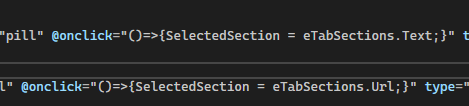](/uploads/images/gallery/2024-10/zAzimage.png)
It then allows you to write code that renders different HTML.
[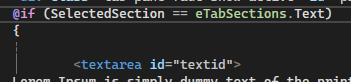](/uploads/images/gallery/2024-10/yYnimage.png)
# MAUI - IOS Emulator / Building without MAC
It seems nearly impossible to run an Iphone emulator without a Mac or Iphone device.
You could invest in a Mac / Macbook or reason to get something cheap refurbished for a few builds.
But for my development, [http://www.macincloud.com](http://www.macincloud.com) was sufficient and quite fast to continue my work.
Just make sure to get the option to SSH - so you can pair your "Mac in the cloud" to your Visual studio.
Use the credentials that come with the subscription.
[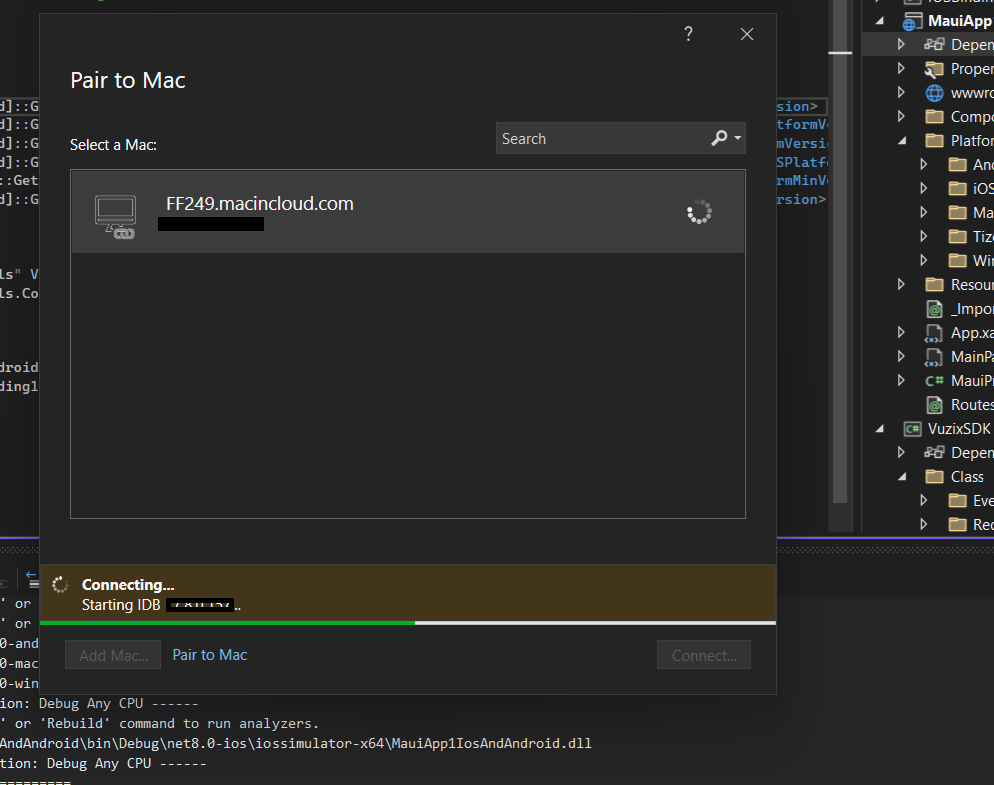](/uploads/images/gallery/2024-10/shRimage.png)
Once it is paired, you then can debug on an Iphone Emulator
[](/uploads/images/gallery/2024-10/pj1image.png)
# MAUI - physical IPhone deployment (without Mac)
In some cases the MacInCloud isn't sufficient: to test BLE devices you do need a physical device, for example.
In that case, you can get a cheap [Iphone SE2020](https://swappie.com/be/model/iphone-se-2020/) or simular - unfortunately you cannot link that phone over RDP (your macincloud) to its USB to deploy via Visual Studio.
1\) You'll have to [install Itunes ](https://support.apple.com/en-us/118290) and get a developer account
2\) You'll have to activate your developer account (which is 99€ annually)
[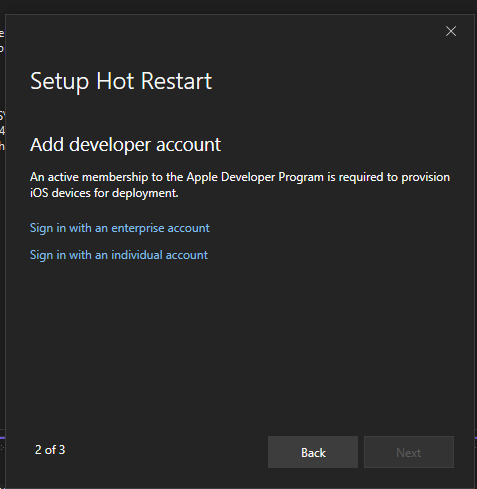](https://wiki.sophior.com/uploads/images/gallery/2024-10/ssKimage.png)
# MAUI - Connect IPhone to debug
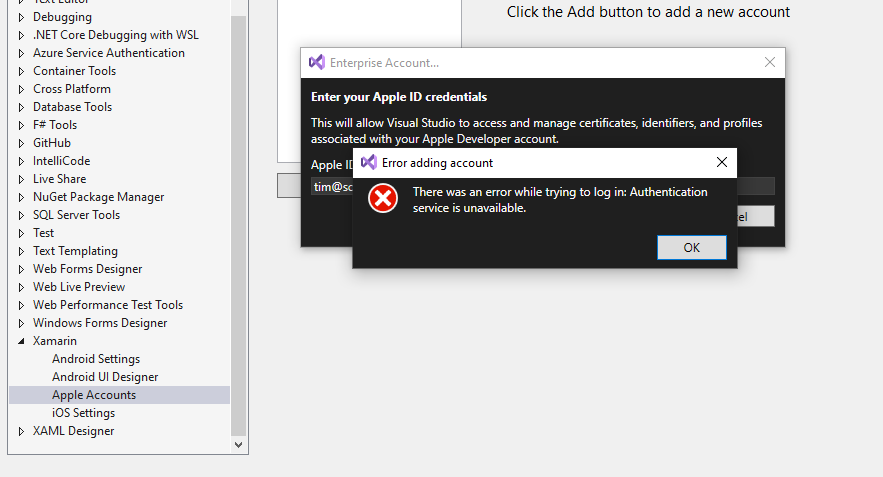
According to Microsoft, an Itunes installation on Windows is enough to target the phone.
However, after some days of debugging (and setting up a virtual machine to generate keys instead) - it turns out that it's a functionality that's broken. Either by Apple or Microsoft.
At time of writing (November 2024) - it hasn't been resolved.
https://developercommunity.visualstudio.com/t/Cannot-add-Apple-Account-VS-2002-Enter/10773193
[](https://wiki.sophior.com/uploads/images/gallery/2024-10/0climage.png)
# Visual studio project version
Define a post-build to create a version file
```xml
Exe
net8.0
enable
enable
False
1.2.3
%(AssemblyInfo.Version)
```
# Azure
# Pipeline - building offline packages
I had trouble linking packages in the pipeline which blocked building solutions.
The shortest path I could find, was to update configuration to look into my defined folder.
And get a zipfile from an online resource, and extract it into this folder.
Update the configuration
```xml
[....]
```
Define your pipeline task
```
- task: PowerShell@2
inputs:
targetType: 'inline'
script: |
Invoke-WebRequest 'https://dl.dropboxusercontent.com/scl/fi/XXXXXXX8vl&dl=0' -OutFile '$(Build.ArtifactStagingDirectory)/NuGetPackages.zip'
- task: ExtractFiles@1
inputs:
archiveFilePatterns: '$(Build.ArtifactStagingDirectory)/NuGetPackages.zip'
destinationFolder: '.\Packages\NuGetPackages'
cleanDestinationFolder: true
overwriteExistingFiles: false
```
# IIS Rewrite URL - basepath
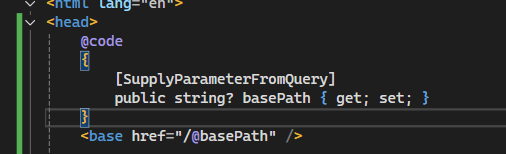
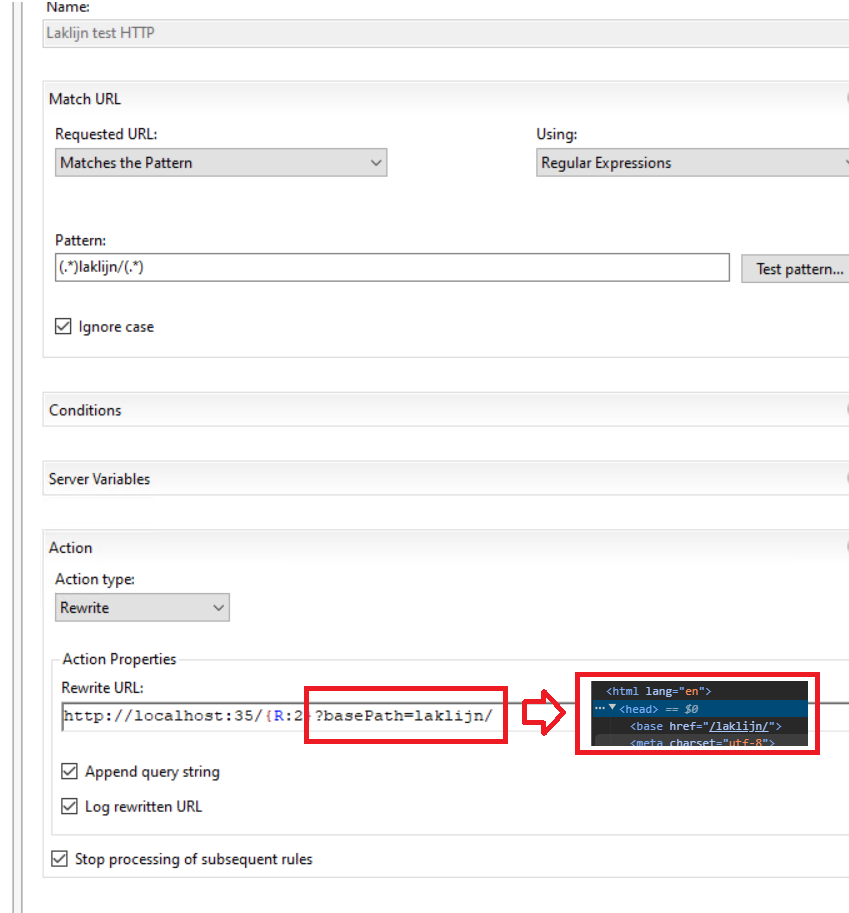
When you write a rewrite URL, and there is a subfolder, you will end up that the target application might not know how to manage the relative paths.
1\) Write in the App.razor some code to receive the BasePath
[](https://wiki.sophior.com/uploads/images/gallery/2024-12/wNCimage.png)
2\) In the rewrite rule append the basepath
[](https://wiki.sophior.com/uploads/images/gallery/2024-12/image.png)
# Get Path of MSBUILD
```xml
reg.exe query "HKLM\SOFTWARE\Microsoft\MSBuild\ToolsVersions\4.0" /v MSBuildToolsPath
```
# Nuget packages: Shared library in NET9.0 SdkProject
A nuget project doesn't include a references shared library.
***(opening the Your.Client.1.0.1.nupkg should have the library in the "lib" folder)***
You can force it by modifying the cs.proj
```xml
..\SecurityHoney.Lib.Shared\bin\Release\net9.0\Your.Lib.Shared.dll
true
true
lib/net9.0/
true
lib/net9.0/
```